
958549476-PAO-Computer-Assisted-Audit-Techniques.pdf

Government of India
Ministry of Communications
Department of Posts
Computer Assisted Audit Techniques (CAATs) Manual for Modified Internal Audit Mechanisms At Postal Accounts Offices
Edition – 2022
Issued under the Authority of Secretary, Posts.
Messages
Secretary Posts
It gives me great pleasure to release the CAATs Manual prepared by Office of the General Manager (Postal Accounts & Finance), Kolkata under the guidance and direction of Sr. DDG(PAF). It will help all Internal Audit teams across the country as well the DDOS to understand the process of checking and correcting Postal Accounts. We are living in a knowledge era where the skill sets are keys to harnessing the power of technology to be effective as knowledge workers. Computer Assisted Audit Techniques (CAATs) manual will enable using technology for increasing the effectiveness and efficiency of auditing. CAATs manual will enable auditors add value through the assurance process which will become more robust and comprehensive. These techniques are not specialist tools designed for use by specialist IT auditors but these are common techniques which can be easily mastered to audit in a computerised environment. This manual provides an overview of the process, approach and techniques which could be used by Department of Posts, for improving all its services.
With best wishes,
Vineet Pandey
Secretary (Posts)
Messages
DG Posts
As we are on a process of computerisation of all services, its accounting and audit needs to move towards a paperless environment. CAATs will enable the process of ‘control and correct’ for all the stakeholders. Computer Assisted Audit Tools and Techniques will enable the Postal Accounts Organisation to keep watch over the most critical functioning of “control and correct” in a most accurate manner. The Modified Internal Audit environment entails 50% of the auditee units to be covered in a year by the home circle and rest by an external circle. In such a large scale of activity, the use of CAATs becomes imperative. CAATs include techniques such as generalised audit software which move queries, trace mappings and prepare customised utility tools with expert precision. CAATs help to evaluate the controls by extracting data and examining relevant processes to confirm whether the accounts are accurate and precision of the values is ensured.
Alok Sharma
DG (Posts)
ii
Forwarded
In the workshop held at PAO, Nagpur on Modified Mechanism on Internal Audit in accordance to the Internal Audit Manual revised and circulated vide OM No. 1-4/2021-PA (IA)/1425-1484 dated 01.12.2021, whereby GM(PAF), West Bengal and DA(P), Nagpur were authorised to interact with Pr. AG, Regional Training Centre, Nagpur to establish a mechanism of CAAT by merging PA, IA and CAAT. Based on the decision from RTC, Nagpur Ms Excel was chosen for internal audit by Postal Accounts Office.
CAAT process can be captured in the acronym “PRACTICES” which are:
(1) Probe and penetrate into process.
(2) Review and reconcile the data.
(3) Analyse the ramifications.
(4) Collate and classify data.
(5) Test reliability of the queries.
(6) Inquire independently.
(7) Confirm with Auditee.
(8) Examine data flows.
(9) Search & Simulate
Cost, complexity and security of the output are principle issues for CAAT. By this manual, IT generated Control Audit entails the verification of data and file integrity in parallel. This manual brings out entire process in the following process.
1. Infrastructure required. Eg. Computer Centre, Network access etc. 2. Manpower requirement depending on number of transactions handled and its training.
3. Process of data mining.
4. Collation and collection through the Co-ordination Cell for use by the Internal Audit Sec.
5. Preparatory Audit
6. Field Audit
7. Finalisation of IA Report.
I am hopeful that it will change the auditing environment successfully.
G. K. Padhy
Sr. DDG (PAF)
iii
Preface
The process of computerisation in the Department of Post enabled the organisation to integrate all its verticals – Mails and Parcels, Savings Bank, Postal Life Insurance, Rural Life Insurance, IPPB and its HR Management into Core System Integration (SAP). Since PAO has the role of compilation of accounts and internal audit, the entire database provided on ample platform for CAATs, Finnacle and McCamish were used for Core Banking System and PLI respectively. When the process of modifying internal audit was undertaken by Sr. DDG, it was the harbinger for change. In the workshop held at PAO, Nagpur from 23.11.2021 to 25.11.2021 under the Chairmanship of Shri G. K. Padhy, Sr. DDG(PAF), the innovative vision of path using technique of Audit through system-oriented manner was discussed threadbare. As a sequel to the workshop, PAO, Kolkata was vested with the task of drawing up the CAATs Manual. Taking the lead, Kolkata team undertook the process of “metamorphosis” by redefining Postal Accounts section and reassigning it as Finance and Accounts where all data flowed. Head Offices being the profit centres were mapped as accounting units. The continuous flow of data was channelized into parts – HR and FS so that all data could be concurrently examined before the monthly compilation. Once the process started, it proved to be a game changer. Pre-check before pushing into PFMS gave insights into its correctness and veracity. The search for irregularities and corrections and more analysis could be undertaken. This is an ever-evolving exploration where expertise and skill sets of the staff will be the biggest enabler. Therefore, training will be a continuous process. A training of trainers for all Circles undertaken at Kolkata in Jan-March 2022 brought more insights and exchange of ideas. Compiling all the methods and techniques for discovering patterns, trends and exceptions, the journey was very interesting as the reader will see during the process of learning. For working with the CAATs, it is essential for the accountant and auditor to select the right data and right time period. This requires professional expertise for it. The Manual is in this direction of documenting the analytical tools after selection of data. It will contribute to the efficiency of the auditors. Whether evaluating the department’s internal controls or extracting specific information, they are common in probing and forensic audits. CAATs boost the productivity of the auditors who can use the field audit for confirmations and corrections rather than getting bogged down by data. Need for preparing the team with available information in PAO was felt. Preparatory audit gives a holistic view


iv
of various areas of priority and focus during the audit. Since internal audit calendar provides limited time for each office, this preparatory process enables the audit team to go duly supplied with data and details to “control and correct” in more effective manner. The internal audit questionnaire has been converted into concurrent, monthly and field audit mode to cover its vast scope in efficient manner. Since this process is customised to the needs of the department, humongous volumes of data can be optimised significantly in short period specific for each audit party. Thus, a “metamorphosis” takes place by aligning DDOs to the PAO in systemic, Region-wise profit centre basis. Concurrent audit of data flowing through SAP in CSI which was accrual based was corrected before pushing into cash based CGA report and PFMS i.e. consolidated fund of India. HR Audit reviewed by employee’s portal to check entitlement eligibility and accuracy of payment. Financial services were brought under a single roof to reconcile Finacle and McCamish figures with CSI entries. Thus, all discrepancies were corrected on daily basis, checked and compiled monthly and those which persisted were handled over to a Single Point called Co-ordination Cell for benefit of the Audit Team who could confirm with Auditee. With use of CAATs manual, auditors will “control and correct” the system more effectively. Since it I an evolutionary process, the journey has just began!!


Dr. Shikha Mathur Kumar,
Chief Editor & GM(PA&F), Kolkata

v
Acknowledgement
The continued invaluable guidance & encouragement given by Sri G. K. Padhy, Sr. DDG(PAF) is placed on record in bringing out the first edition of CAATs Manual by PAO Kolkata. We express our sincere thanks for his immense motivation in course of preparation of this manual. The release of this first edition of CAATs Manual is the joint effort of many officers of PAO Kolkata.



Chief Editor : Dr. Shikha Mathur Kumar, GM (PA&F), Kolkata
Assistant Editor : Sri Pradip Pramanik, DA(P), Kolkata
Acknowledgements are due to the members of the committees who participated in the meetings, deliberated & offered valuable suggestions for developing modern techniques of audit by analyzing data in various fields of Postal works/financial management in such short time span thereby making it possible for the release of the CAATs Manual.



Input Committee :
Sri Pulak Sinha, DDA(P), Sri Neeladrishekhar Ray Chowdhury, Sr. AO, Sri Dalim Naskar, AO, Smt. Barnali Bhattacharjee, AO, Smt. Lovely Chowdhury Sengupta, AO, Smt. Anamika Mukherjee, AO, Smt. Suchismita Mohanty, AAO, Sri Sanat Sarkar, AAO and Sri Mrityunjoy Karmakar, AAO.



Compilation Committee :
Sri Prasun Kumar Basu, ACAO, Sri Ashis Ghosh, AAO, Sri Abhijit Basu, AAO
The manual aims at carrying out a new mechanism on Internal Audit of various units in DoP extensively. This manual has been developed due to change in working methodology under digital environment. As it is a new mechanism, we the PAO Kolkata Team experienced that CAATs is a learning process & there is ample scope to develop new field of auditing by continuous experiments, review & analyzing more & more data we received through systems. However, further suggestions if any, are always welcome. The user’s feedback will help in improving the quality of the manual in future.


Cover Designed By: Sri Soumen Dasgupta, Steno Gr-II
vi
Contents
Chapter No. Description Page No Chapter – 1 Introduction




Chapter – 2 Infrastructure

2.1 Workstation & Networking
2.2 Manpower
2.3 Training
Chapter – 3 Human Resource
3.1 Introduction


3.2 Work-flow Off-cycle Payment

3.3 Work-flow On-cycle Payment
3.4 Few observations on preparatory Audit in

consonance with modified IA Questionnaire
Chapter – 4 Finance & Accounts
Chapter – 5 Financial Services
Chapter – 6 Co-ordination cell
Chapter – 7 Conclusion
Appendix 1 Frequently used GLs with corresponding Head of Accounts
Appendix 2 CAAT relevant Modified IA Questionnaire.
vii
Introduction
Introduction
Computer Assisted Audit Tools and Techniques will enable the Postal Accounts Organisation to keep watch over the most critical functioning of “control and correct” in a most accurate manner. The Modified Internal Audit environment entails 50% of the auditee units to be covered in a year by the home circle and rest by an external circle. In such a large scale of activity, the use of CAATs becomes imperative. CAATs include techniques such as generalised audit software which move queries, trace mappings and prepare customised utility tools with expert precision. CAATs help to evaluate the controls by extracting data and examining relevant processes to confirm whether the accounts are accurate and precision of the values is ensured. In Kolkata Postal Accounts Office the CAATs have been attempted to be used in three parts (1) Postal transactions captured in CSI F&A systems. (2) Human Resource Management through ESS portal. (3) Financial services like (a) SB/CC and IPPB on Finacle (b) PLI on McCamish (c) MO/IMO/IPO and WUMT being CSI based systems.



Since entire data finally flows into CSI, it is the repository of entire gamut of transactions from Point of Sale to PFMS and e-Lekha where it goes into Consolidated Fund of India/Public Accounts respectively.
CAAT process can be captured in the acronym “PRACTICES” which are:
1
CAAT Manual for PAO Offices
Cost, complexity and security of the output are principle issues for CAAT. IT generated Control Audit entails the verification of data and file integrity in parallel. We will examine the process in following format so that it can be replicated easily in all other offices in the country..
(1) Infrastructure required. Eg. Computer Centre, Network access etc.
(2) Manpower requirement depending on number of transactions handled and its training.
(3) Process of data mining.
(4) Collation and collection through the Co-ordination Cell for use by the Internal Audit Section.
(5) Preparatory Audit
(6) Field Audit: Authorization of data access of auditee unit may be provided to the audit team to enable confirmation of the findings.
(7) Finalisation of IA Report.
2
Infrastructure
2. Infrastructure
For implementation of CAATs, the IT knowledge & expertise and suitable computer facilities with relevant data is required to be provided to the experienced audit team. Hence, is required to establish a computer work stations for each of the verticals, F&A, HR, F&S and Co-ordination Cell. The computers of these workstations should be connected through LAN with the facility to access the data of different on-line software systems which are used in the Department of Posts viz. CSI, Finnacle, McCamish, etc. so that live data can be fetched directly from the system.
2.1 Workstation & Networking
Sample diagram of PCs and Networking:
Fig. 2.1: Floor Plan of F&A section at 2nd Floor
4
CAAT Manual for PAO Offices
Fig. 2.2: Floor Plan of HR Audit section at 10th Floor
Fig. 2.3 Floor Plan of FS section at 11th Floor
5
2.2 MANPOWER
Infrastructure
HR Section: In HR Section Day to day audit of transactions related to personal claims of staff were done. Requirement of manpower for this section will be based on the transactions of a particular DDO & total number of DDOs under the jurisdiction of a particular PAO. On an average basis of transactions normally made in a DDO, 7-8 DDOs may be allotted to a Senior Accountant for the works related to Off-Cycle transactions. Similarly another Senior Account is also required for observing the on-cycle payments related to the same DDOs.
Finance & Accounts: Requirement of manpower will be based on the transactions of a DDO. On the basis of that two DDOs may be allotted to a Senior Accountant for accounts related works and a single DDO where transaction is huge. One or two AAOs may be attached in the section and one AO as Section officer.
Financial Services:
SB Section: Based on generation of accounts statistics report, Accounts statistics transferred in/out report in r/o all SB schemes from Finacle, extracting G/L reports of all SB schemes from SAP, reconciliation between Finacle figure & CSI figure, Checking of manual voucher posting and other related works for all HPOs, 4 (four) DDO may be allotted to one Sr. Accountant. One or more than one AAOs may be attached for smooth monitoring in r/o the above mentioned works of the section and one AO as a Branch officer.
CC Section: Based on generation of accounts statistics report, Accounts statistics transferred in/out report in r/o NSC/KVP schemes from Finacle, extracting G/L reports of NSC/KVP schemes from SAP, reconciliation between Finacle figure & CSI figure, Checking of manual voucher posting and other related works for all HPOs, 8 (eight) DDO may be allotted to one Sr. Accountant. One or more than one AAOs may be attached for smooth monitoring in r/o the above mentioned works of the section and one AO as a Branch officer.
IPPB Section: Based on generation of daily reports from Finacle and SAP for deposit & withdrawal as well as for the purpose of reconciliation of Finacle and CSI data on daily basis, 15-16 DDOs may be allotted to one Sr. Accountant.
6
CAAT Manual for PAO Offices
Moreover, monthly reconciliation between CSI and e-Lekha is also done for all DDOs. It is also pertinent to mention that correspondence is required to be done on regular basis for settlement of the discrepancies. In addition to above the following works are also being done:
i) Maintenance of Service Book of the DOP employees who are working in IPPP on deputation Basis.
ii) Maintenance of Resister for various service benefit of DOP employees who are working in IPPP on deputation Basis such as CGEIGS, Leave Salary Contribution, NPS Contribution, GPF Contribution, Interest Bearing Advance, Register of Leave etc.
iii) Other miscellaneous work.
For IPPB section 4 SA/JA, one AAO may be attached and one AO/Sr. AO as Branch Officer.
MO Section: Manpower required for generation of G/L reports from CSI, reconciliation with returns received from HOs and other related works. 10-12 DDOs may be allotted to one Sr. Accountant. One AAO may be attached in this section and one AO as a Branch Officer.
IPO Section: Manpower required for generation of G/L reports from CSI, reconciliation with returns received from HOs and other related works. 10-12 DDOs may be allotted to one Sr. Accountant. One AAO may be attached in this section and one AO as a Branch Officer.
WUMT Section: Manpower required for generation of G/L reports from CSI, reconciliation with returns received from HOs and other related works. 10-12 DDOs may be allotted to one Sr. Accountant. One AAO may be attached in this section and one AO as a Branch Officer.
PLI Section: Manpower required for generation of G/L reports from CSI and report from Mc Camish , reconciliation of CSI Report and Mc Camish on regular basis and correspondences with the respective Hos. Considering this 10-12 DDOs may be allotted to one Sr. Accountant. One AAO and one AO as a Branch Officer may be attached in this section.
7
Infrastructure
Co-ordination cell: The Branch Officers of PAO are submitting the issues pending at Units, irregularities detected etc. to Coordination cell by 10th of every month. Co-ordination Cell tabulates all data in a single excel sheet and analyses data to examine performance of units. AO/IA, being the in charge of the cell, select the units for inspection depending on the performance of the unit. Practically, poor performing units are first selected for physical visit for internal inspection to enhance the performance of that particular unit and solve the issues there. This Cell also provides consolidated data, DDO Code, Profit Centre, Number of TNF Offices, Facility ID, etc. to the Internal/external Audit Team of PAO before starting their inspection at the units.
This Cell also provides consolidated data, DDO Code, Profit Centre, Number of TNF Offices, Facility ID, etc. to the Internal/external Audit Team of PAO before starting their inspection at the units. This cell is an extended part of Internal Audit Section which can be managed by 2(two) Sr. Accountants who will be headed by a dedicated AAO as section officer. The AO(IA) also will monitor the functioning of this cell as Branch Officer.
2.3 TRAINING
Necessary training needs to be imparted to selected officials from each circle who will be treated at Master trainer for that Circle. These Master Trainers will train all officials of that Circle.
Theoretical and Hand-on training need to be arranged for all the officers/officials working in F&A, HR, FS, IA and respective section of Co-ordination cell for at least two days. As per decision taken the entire process should be done in Ms-Excel for importing data from different Application Packages used in DoP, stratification, sorting of data for analysing. Sampling of data of test month can be done selecting random sampling method or systematic sampling depending on requirement. Detection of duplication data is to be done to see the large volume of data to pin-point specific duplicate entry and missing links which is called GAP detection. Age analysis is to be done to arrange data chronologically in term of days/months/years to draw inference. Using of Formula and equations to analyze the data. Consolidation of data is to be done to summarize findings using Pivot Table.
8
CHAPTER I: INTRODUCTION
Purpose: Need of HR Audit
As data is available centrally at PAO through SAP(CSI), a new approach is taken to analysis Human Resource data in respect of each DDO on regular manner.
Human Resource (HR) Audit is,
Prima Facie Checking of Bills Paid in real time basis (T+3 Days) through CSI HR Module; both off-cycle and on-cycle payments
Audit is done in both concurrent and monthly basis.
Observation prepared on monthly basis is handed over to different sections for further checking with voucher (F&A Audit) and F&A Accounts, to IA as well as Co-ordination cell to provide hands-on data to IA team.
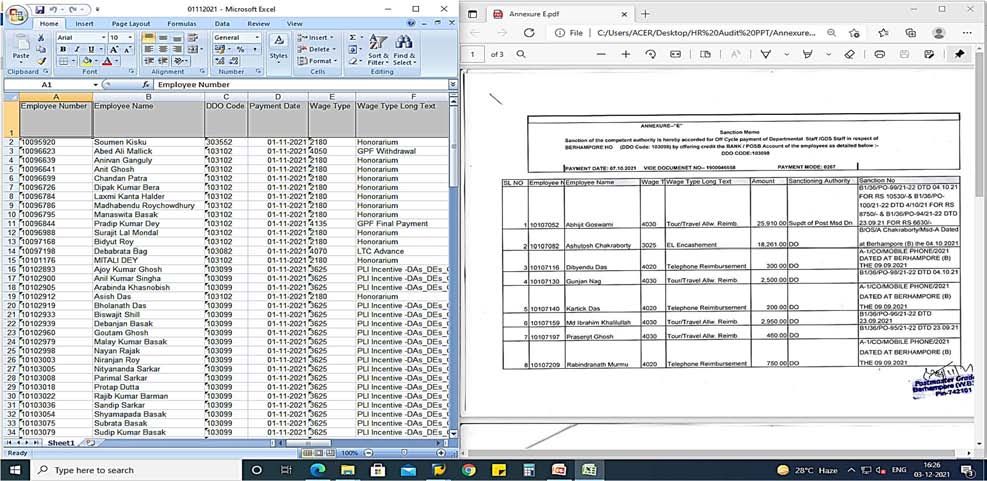
A Format called “Annexure E” (Image 1) has been devised at PAO Kolkata which is forwarded by all DDO on T+3 basis to HR Audit Section.
HR Audit
Function: Analysis of data in HR Audit
ER Details for cross verification such as salary is paid to the employee within the sanctioned strength and equal to the working strength.
On cycle and off cycle payment and irregularities noticed is verified at unit on checking the documents/records.
Section will check PA20 for verification w.r.t individual Employee to get all the relevant information regarding the off-cycle payments (Family Particulars for CEA Payments, Leave Balance for LTC Leave encashment etc).
On generating the Trial Balance, every transaction is analysed and outcome is verified at spot.
CHAPTER II: WORK FLOW- OFF-CYCLE PAYMENT
DDO makes
payment Step 1: PAO Download Off Cycle Data and Payment particulars on regular basis
DDO
forward Annexure E to PAO on
DDO wise off-cycle
data is saved Concurrent Audit
T+3 basis Annexure E is compared
with Off-Cycle data on
regular basis
Whether both
data agrees?
Yes
Mention in monthly
report
No
Raise
observation to DDO
Monthly Audit
Monthly combined
data is compared
with Traisl Balacne
Step 2: PAO Downloads
Trial Balance
Monthly off-cycle saved
data is combined
No
Mention in
Whether both data
agrees?
Yes
Mention in
monthly
report
Forward the report to different sections for further action
monthly report
HR Audit
Process: Downloading of Off-Cycle data
Step by step procedure for exporting data into MS-Excel
T code :- Zpy_menu
Reports :- Offcycle reports
Off-Cycle Reports
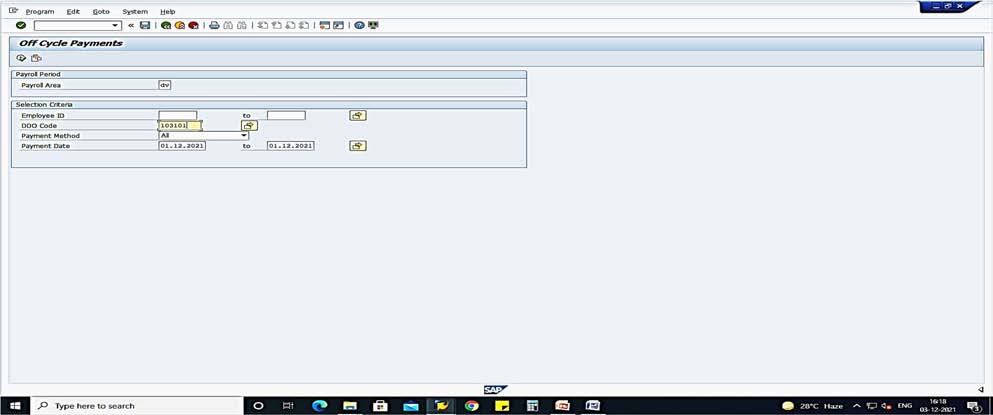
Click on offcycle reports. The off-cycle report dialog box appears. Now fill up the relevant fields as follows:
In the Payroll area box select ‘DV’
In the DDO Code box enter the DDO Code of the target office (e.g.103101
In the ‘payment date’ dialog box enters the month of inspection: Execute
Execute
Start End
Then click on execute and Off-cycle report of that DDO for the period mentioned appears Now for exporting data into MS-Excel following steps are to be done :- Click List
Click Export
Click Spreadsheet
All character fields will be exported into MS-Excel.
HR Audit
Now using the ‘Sort & Filter” menu all character fields can be filtered as per requirement e.g. TA, LTC, Medical leave salary etc.
Process: Checking of Actual payment
T Code: zbank_pay_oc
In order to confirm that the documents at the Cashier are also posted and payments arranged, check in TCODE: zbank_pay_OC. The date of off cycle process in this screen is normally the next date of request.
Check
amount
When executed, if the data is displayed here, it confirms payment has been gone to bank. If not seen here, it means the ID is facing some errors.
Process: Comparison of Annexure E and Off-Cycle data
This is to compare downloaded data with the Sanction memo/ Annexure-E. If any discrepancy/issue observed, concerned DDO is intimated through email in the shape of observation with a request to examine the case and do necessary correction and send compliance to PAO.
HR Audit
Process: Generation of Trial Balance (Monthly)
T Code: s_pl0_86000030
Process: Customization of Trial Balance as per requirement
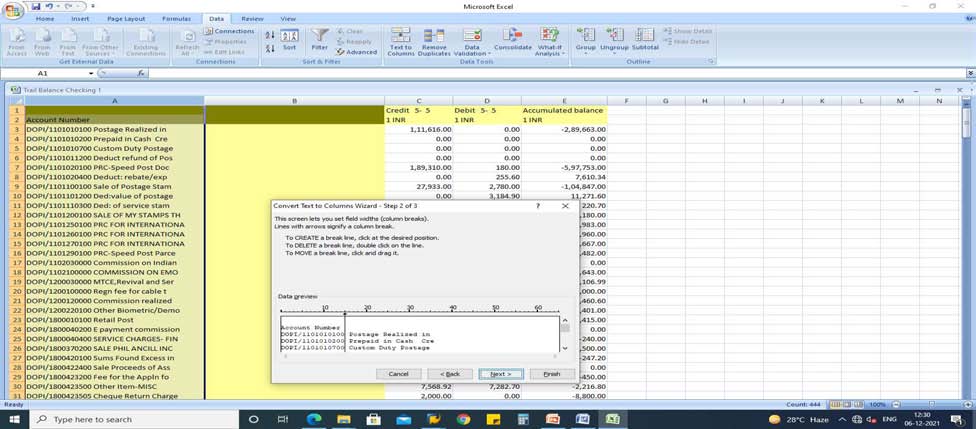
Exporting data into MS-Excel following steps are to be done:
Click List
Click Save
Click Local file
Check “Text with Tabs” (Radio button)
Delete unnecessary columns
Delimit first column
HR Audit
Process: Comparison of Trial balance and Off-Cycle data
This is to compare Trial Balance with combined Off-cycle data of respective month.
Combine all Off-cycle data in a single file.
Filter as per Wage Type and DDO wise
Compare the data with Trial balance figure of concerned DDO
Prepare monthly report. In case of any discrepancy, mention it in Report.
HR Audit
Total
amount
Here, the total payment against particular head (here e.g. Children Education Allowance) is tallied with the trial balance figure. If there is any discrepancy found, objection is being raised and forwarded to concern DDO and F&A section.
Amount in
TB
Process: Checking of Off-cycle Payment- an example
In this instant case, CEA has been taken.
Download off-cycle details through SAP
Match the details in Off-cycle data with corresponding Annex ‘E’ sent by DDO concerned. Check the amount whether it’s more than prescribed limit.
Checking whether the amount for hostel subsidy and CEA should not be paid under same wage type.
Checking family details and incorporation of dependent children in CSI.
HR Audit
Checking payment particulars of CEA in pa20 whether more than once paid during the same year.
Finally checking the reflection of paid amount under correct GL in Report fetched using FAGLL03 from the SAP
HR Audit
Process: Preparation of Monthly Report
At the end Monthly Off-cycle is prepared which is forwarded to all concerned sections for further necessary action.
Format of monthly off-cycle report:
CHAPTER III: WORK FLOW ON-CYCLE PAYMENT
Download ER Details, Master Data and Paysheet of DV,PV and GV at PAO
Download Payment details at PAO
ER
Details
Paysheet
Master Data
Compare Payment figure with Paysheet
Compare the above data to
examine Sanctioned and
Working strength
Examine the above data and
do all possible analysis
Prepare report and forward to all concerned sections
HR Audit
Process: Download ER Details
Step by step procedure for exporting data into MS-Excel
T code : Zhr_erdetails
Reports : ER reports
ER
Reports
Process: Download Master Data
Steps for downloading Master Data from CSI SAP
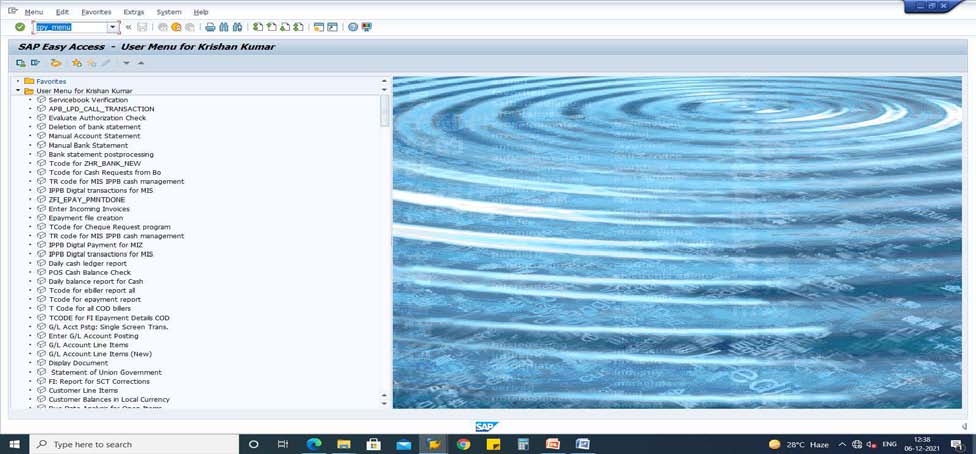
1. Open SAP > use T code “ ZPY_MENU” > Execute the T code
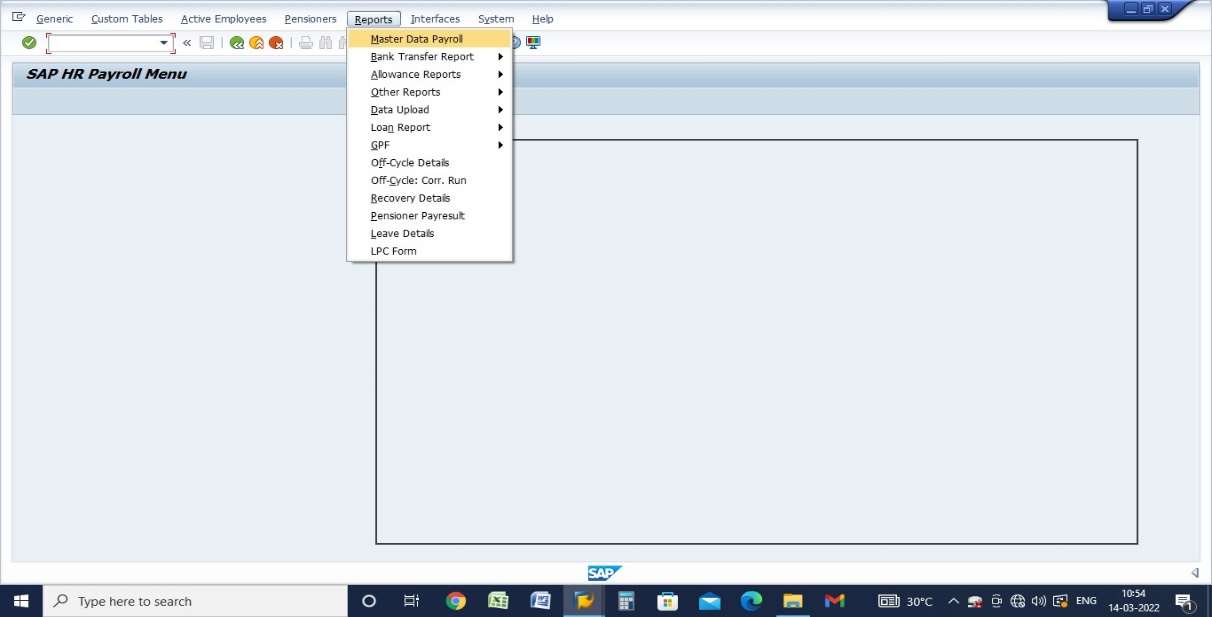
2. Go to Report (As shown in Diagram I) click on Master data Payroll ( yellow bar ).
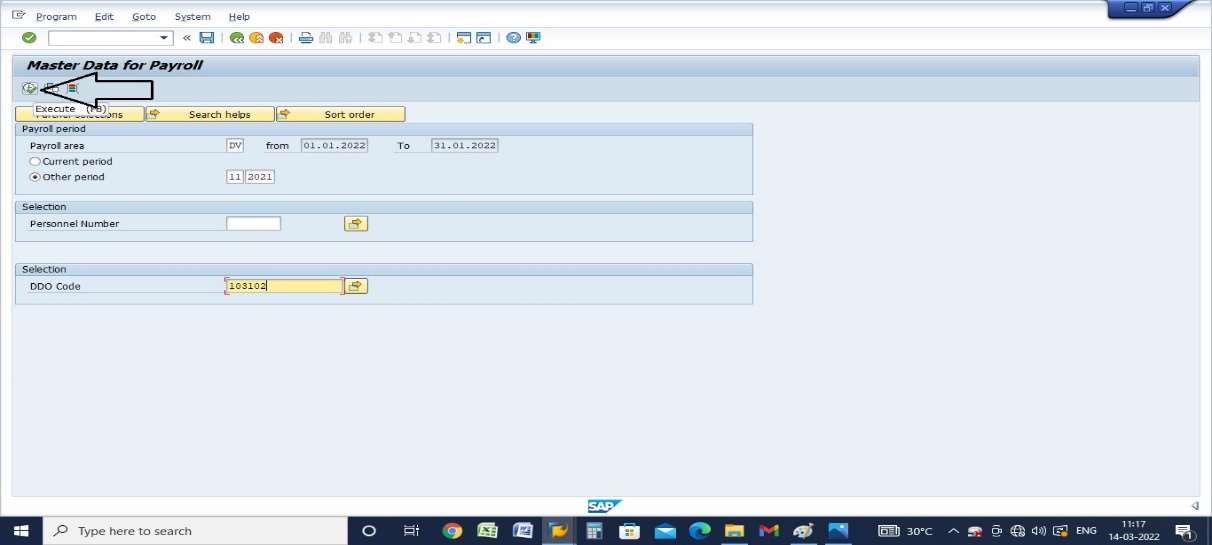
3. Select payroll area DV/GV/PV > select period, e.g, 1 stands for March, 2 for April and so on (observe the arrows as shown in diagram II.
4. Fill the column for respective DDO code (Diagram III)
5. Click on the execution button after filling up of the desired fields as described above (See diagram IV).
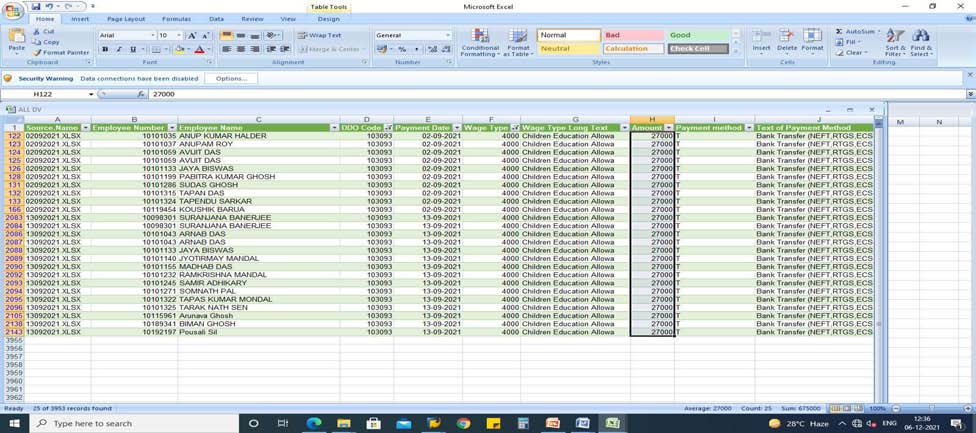
6. Master data is ready for exporting to excel, go through the bars (See Diagram V) 7. Save master data in excel in “Save As” type: Excel (“XLSX”) ( see diagram VI).
Diagram I
Diagram II
HR Audit
Diagram III
Diagram IV
Diagram V
Diagram VI
HR Audit
Process: Downlaod PaySheet
Step by step procedure for exporting data into MS-Excel
T code : Zpy_menu
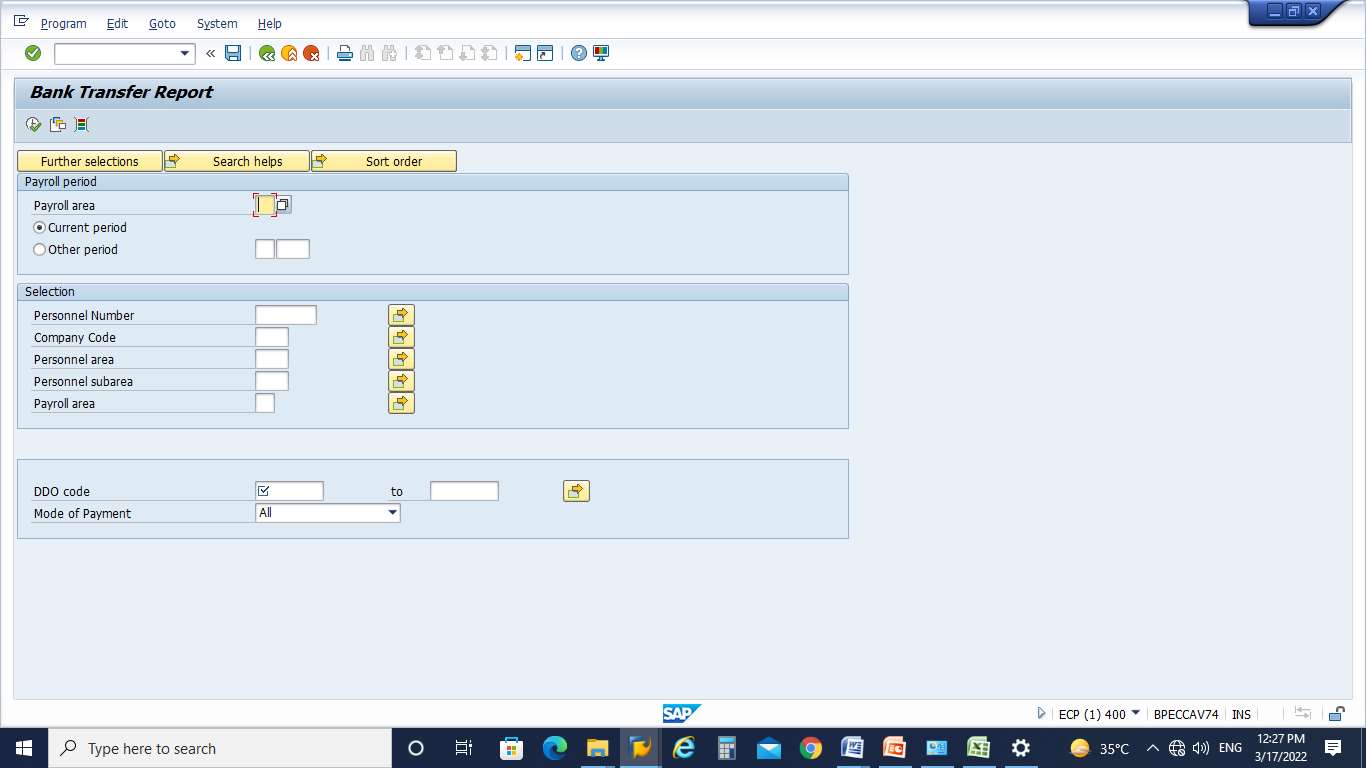
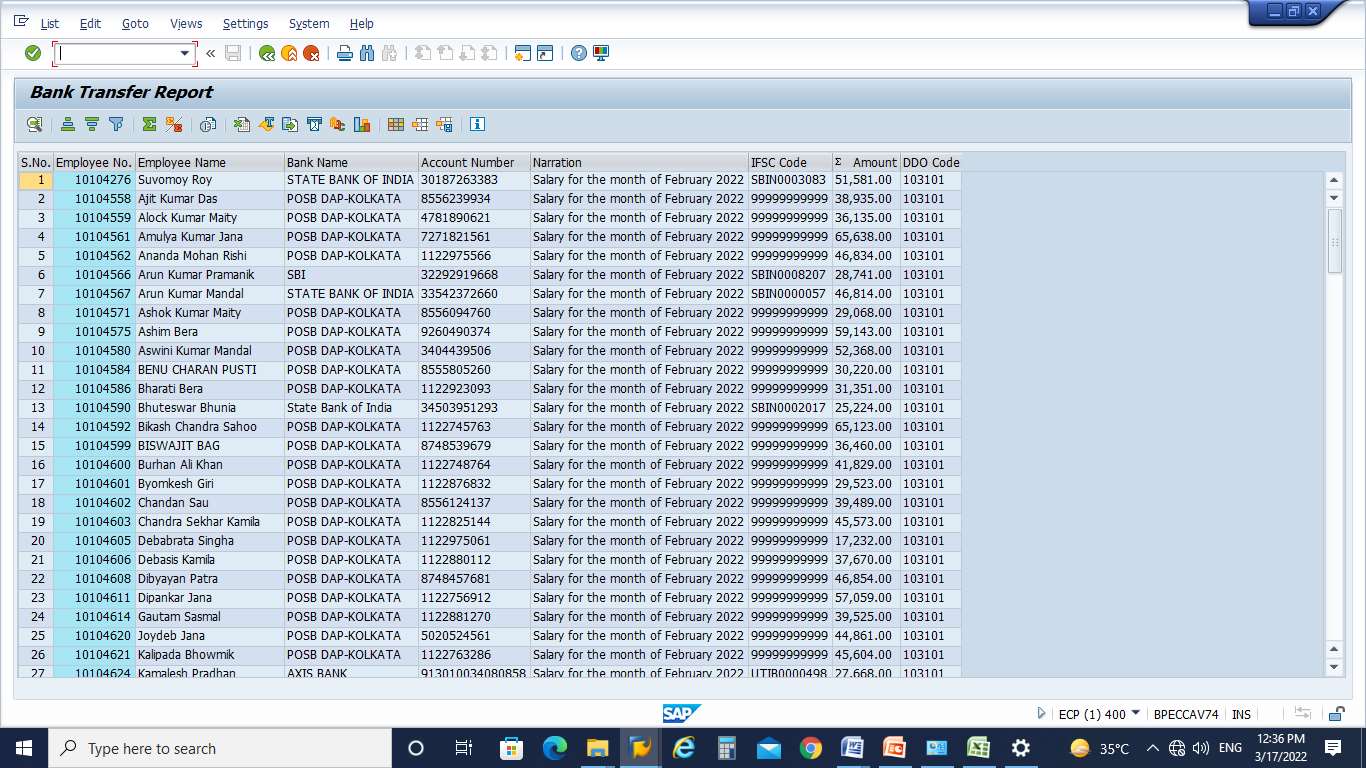
Reports : Bank Trasfer Report Paysheet
Paysheet
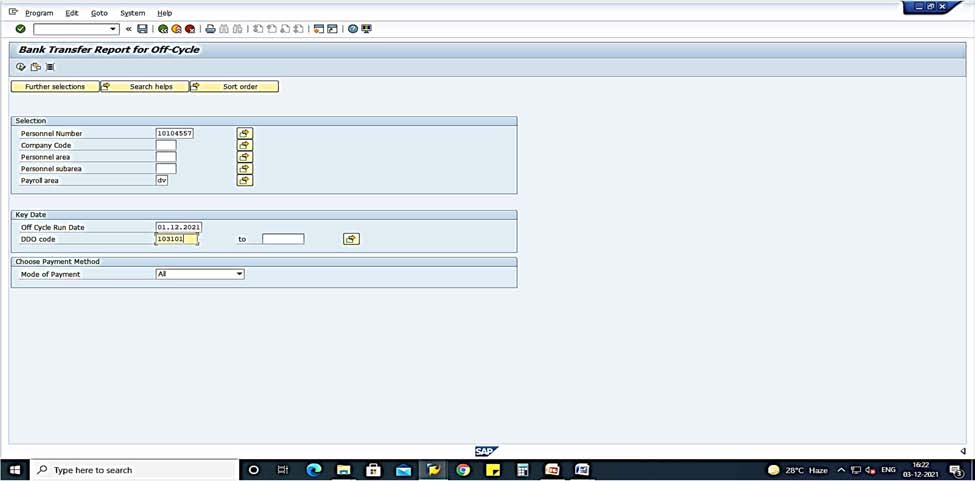
Click on Paysheet. The dialog box appears. Now fill up the relevant fields as follows : In the Payroll area box select ‘DV’
Enter appropriate period
In the DDO Code box enter the DDO Code of the target office (e.g.103101) Execute
Export the data in MS-Excel.
Customize excel as per requirement.
HR Audit
Process: Checking of Cost Centre
Blank Cost Centre
In case, cost Centre is blank the amount is charged in DAP which in turn creates mis-match in DDO wise figure.
CHAPTER IV: FEW OBSERVATIONS AS A PART OF PREPARATOTY AUDIT WITH REFERENCE TO INTERNAL AUDIT QUESTIONNAIRE
1. IA Questionnaire: No. 17
While reviewing various GL reports of Field Units 15% of the entries of grant of short term advances such as TA, LTC, Medical Leave Salary advances etc. should be picked up with reference to the HR schedule and ensure its settlement and adjustment in the final bill/ recovery.
Process:
It is being checked with reference to HR Schedule in regularly as well as monthly. The off cycle observation report as mentioned above is prepared and forwarded to FA Audit section to check with Vouchers/Sanction Memo and adjustment thereof.
2. IA Questionnaire: No. 26
Check the generation of Acquittance Rolls wherever applicable to ensure the corresponding Payment GL entry in the respective Profit Centre. (DDO).
Process:
Description: Check the generation of Acquittance Rolls wherever applicable to ensure the corresponding Payment GL entry in the respective Profit Centre. (DDO). Step by step procedure for exporting data into MS-Excel
T code :- zpay_bank
Reports :- On-cycle report
DV Now fill up the relevant fields as follows :
In the Payroll area box select DV
Now for current month click on Current period and for other month click on ‘Other period’
Press Enter. Month will appear next to Payroll area
HR Audit
In the DDO Code box enter the DDO Code of the target office (e.g.103101 EXECUTE
Click on ‘Execute’
From here we can check the Acquittance Roll of the DDO for the selected month.
3. IA questionnaire: No. 29
The fixation of TRCA consequent on new appointments, Redeployment, Transfers in case of ABPMs and BPMs be reviewed for the period between the last date of inspection to the present date of inspection.
Process:
New appointment cases
The fixation of TRCA consequent on new appointments, Redeployment, Transfers in case of ABPMs and BPMs be reviewed for the period between the last date of inspection to the present date of inspection.
Step by step procedure for exporting data into MS-Excel
T code :- Zpy_menu
Reports :- Oncycle reports
PAY SHEET
Click on reports. In the ‘Reports’ menu click on ‘Bank transfer report’ and then click on ‘paysheet’:
REPORTS BANK TRANSFER REPORTS PAY SHEET Following dialog box appears
GV Now fill up the relevant fields as follows :
In the Payroll area box select GV
Now for current month click on Current period and for other month click on ‘Other period’
HR Audit
Press Enter. Month will appear next to Payroll area
In the DDO Code box enter the DDO Code of the target office (e.g.103101) EXECUTE Click on ‘Execute’.
Now for exporting data into MS-Excel following steps are to be done :- Click list
Click export
Click Spreadsheet
All character fields will be exported into MS-Excel.
Cadre column denotes BPM/ABPM (4 HRS/5HRS)
Group (Level) column denotes :-
ABPM – Level 1 (4 hrs) – Rs. 10,000 – Rs.24,470
ABPM – Level 2 (5 hrs) – Rs. 12,000 – Rs.29,380
BPM – Level 1 (4 hrs) – Rs. 12,000 – Rs. 29,380
BPM – Level 2 (5 hrs) – Rs. 14,500 – Rs. 35,480
Now from ‘Date of join’ and ‘ TRCA’ the fixation of TRCA consequent on new appointments can be checked.
4. IA Questionnaire: No. 34(ix)
The off-cycle payments and salary payments (pay sheets) of month of test check should be checked with reference to the sanctions. These payments to be checked in CSI during course of inspection and found any discrepancies or irregularities are to be recorded in the Inspection report.
Process:
Off-cycle and On-cycle Checking process have been mentioned above.
5. IA Questionnaire: No. 36
A test check of Master Data as available in the PAO be compared with the Master Data as available in the HR and check the correctness of payment such as Basic pension, Reduced Pension, Dearness Relief, Enhanced Family Pension, Fixed Medical Allowance, Restoration of Commutation of Pension amount and Payment of additional quantum of Pension/ Family Pension on attaining the age of 80 years etc.
Process:
Examples of monthly reports which are prepared and submitted to Co-ordination cell are given below:
HR Audit
Example 1:
Example 2:
No. of Pensioner’s crossed/completed 15 yrs. From the date of the retirement. This list is prepared and submitted to IA team to check whether the captioned Pensioners Pension has been restored. An example of list of pensioners who have completed 15 yrs of service.
Example 3:
Checking of payment of Additional Quantum of Pension after attaining specific age. The pension paysheet is analyzed every month and report is prepared accordingly which in turn forwarded to IA team. From this list it is checked whether Additional Quantum has been paid to Pensioners who have attained 80/85/90/95 yrs of age.
Example 4:
Consolidated report on example 2 & 3.
HR Audit
Example 5:
A report is prepared at Pension Audit section on monthly basis which is forwarded to Co-ordination cell and IA team.
6. IA Questionnaire: No. 37
Cent percent check on availability of Life Certificates/ Jeevan Praman be conducted
Process:
A list is obtained from all DDOs after the expiry date of collection of Life Certificate and it is checked with Pension Paysheet of the following month.
S.No Pensioner Id Name of Pensioner Whether DLC submitted?
Date of submission of DLC
7. IA Questionnaire: No. 39
Test check payment of Pension through Voucher Posting any be made and comment on the irregularity.
Process:
Step by step procedure for exporting data into MS-Excel
T code :- FAGLL03
GL :- 3070010400 (Superannuation pension)
After entering T code FAGLL03 in SAP
Click on ‘Enter’
Following dialog box appears
Now fill up the relevant fields as follows:
In the GL area box select 3070010400
In the ‘Posting Date’ enter the first date and last date of the target month Click on ‘Custom Selection’
Following dialog box appears
Enter current financial year e.g. 2021
Enter profit centre of the target office
Click on ‘Execute’.
HR Audit
Following dialog box appears
Now for exporting data into MS-Excel following steps are to be done:
Click list
Click export
Click Spreadsheet
All character fields will be exported into MS-Excel.
From the above Excel sheet examine the ‘Tax Code’ and ‘Segment’ columns. If these are ‘V0’ and ‘Other’ respectively, then manual booking has been done for that DDO.
8. IA Questionnaire: No. 40
A check of different classes of pension payment GLs have to be carried out for correctness; and also life time arrears, additional quantum of pension, disbursement mode checks to be carried out and findings needs to be noted in the Inspection Report.
Process:
Already discussed in above..
9. IA Questionnaire: No. 42
The Correctness of GL booking in case of system posted documents and in case of manual Voucher postings should be checked in particular and any variation in mapping of GL be brought into the report for immediate correction in the system.
HR Audit
10. IA Questionnaire: No. 59
The claims for reimbursement of tuition fees in respect of children of Central Government Employees should be checked to see that the Drawing Officers and Heads of Offices or the next superior officer have exercised the necessary check over the information and documents furnished by the employees as prescribed in the Government of India, Ministry of Finance, Office Memorandum No12011/ 03/ 2008 Estt. (Allowance) Dated 2nd September, 2008 and amended from time to time and verified the admissibility of the claims for this purpose. The claims pertaining from the date of last inspection should be checked thoroughly by the Internal Audit Staff.
Already discussed in Off-cycle part.
11. IA Questionnaire: No. 109
It may be ensured that no employee who entered in the Government Service on 01.01.2004 and after whichever is earlier, subscribing the GPF.
Analysis DV paysheet list of employees who have joined in the Government Service on or after 01.01.2004 but GPF subscription is made can be checked.
12. IA Questionnaire: No. 123
Few sample observations are given below:
A. Consolidation of Monthly Paysheet data- Departmental
DDO Wise
B. Consolidation of Monthly Paysheet data- GDS
C. Consolidation of Monthly Paysheet data- Pension
HR Audit
D. Checking of Sanctioned Strength, Working strength (Format)
DDO Name
DDO Code
ER Details (Sanctioned Strength)
Master
Data
(Working strength)
Pay Sheet
(No of employees for which actually salary is
Filled Unfilled drawn)
IA team will obtain Establishment strength during audit at Auditte unit and compare both data.
E. Checking of Net Pay
Column BY is checked to verify whether there is any discrepancy eg. Net pay is not matched. The figure in column ‘BY’ needs to be zero. If any discrepancy found objection is immediately raised to the concern DDOs and necessary action is taken for settlement.
F. Non-deduction of Professional Tax and CGEGIS
G. Deduction of GPF subscription from employees who have joined after 31.12.2003:
HR Audit
H. Irregular Data entry
Incorrect Date of Birth/Date of Joining in Pension Paysheet. Parameter has been fixed as below:
Date of Joining – Date of Birth less than 28 yrs.
Date of Joining – Date of Birth more than 60 yrs
13. IA Questionnaire: No. 129
Check whether all GDS appointed on regular basis on completion of one year are enrolled in SDBS and recovery is being made correctly. And also check whether the application for PRAN is being processed in time.
Check the correctness of NPS/SDBS as in the HR Schedule and F&A CSI figures for a DDO and check if there is any variation. Variation if any be brought to the notice of the DDO for avoiding mistakes in future.
Step by step procedure for exporting data into MS-Excel
T code:- fagll03
Reports: F&A CSI figure
Click on execute. The following dialog box appears. Now fill up the relevant fields as follows:
In the GL Box enter the GL 8007100030
In the Posting date box enter the month of inspection: to
01.01.2022 31.01.202
2
Then click on ‘Custom selection’
Following Dialog box appears
HR Audit
In the Fiscal year box enter 2021
In the Profit Centre box enter profit centres of DDO Code 103120
Then click on ‘Save’
Following Dialog Box appears
Here total amount shows 49,200/-
Now from HR Schedule
Step by step procedure for exporting data into MS-Excel
T code :- Zpy_menu
Reports :- Offcycle reports
| The picture can't be displayed. |
|---|
Click on offcycle reports. The offcycle report dialog box appears. Now fill up the relevant fields as follows :
In the Payroll area box select DV
HR Audit
In the DDO Code box enter the DDO Code of the target office (e.g.103120) In the payment date box enter the month of inspection: to 01.01.2022 31.01.2022
Then click on execute and Off-cycle report of that DDO for the period mentioned appears
Now for exporting data into MS-Excel following steps are to be done :- Click list
Click export
Click Spreadsheet
All character fields will be exported into MS-Excel.
Here the total amount is Rs.49,500/-.
Now the difference be brought to the notice of the DDO for avoiding mistakes in future.
Finance & Accounts
4. Finance & Accounts
This is regarding usefulness of computer based analysis done in Accounts section (namely F & A Section at PAO Kolkata) for Inspection purpose.
Any Discrepancies/ Objections/ Abnormalities noted during the Daily basis checking of different GLs and monthly compilation of accounts are the basic points to be taken into account for inspection of a Unit. The concerned unit heads are to be intimated for rectification/ settlement of objections. The unsettled/ abnormal/ suspected cases, if any, may be analysed and the result thereof to be sent to the Co-ordination cell before commencing of Audit of that unit. The Co-Ordination cell should hand over the same to the Inspection team before commencement of Inspection for verification.
3.1 Daily basis checking in FA module:-
Checking to be done in respect of the following GLs on daily basis before generation of CGA Report. The status of NA items to be checked and in case of any discrepancies found, Matter to be sent to Co-Ordination Cell for further verification during Inspection.
GL Code GL Description Checks to be carried out Remarks 4200000000 Individual Customer Should be minimized
4200000005 One Time Customer Should be zero at the end of
day
4200020009 MO Postman Issue Need to be cleared on a day to
day basis
4200030002 VPP Clearing issue Need to be cleared on a day to day basis
4867100000 Cash in transit No items should be unlinked for more than two days
If any anomaly thus noticed, concerned office may be
contacted or emailed and the anomaly may
4867100011 POS Back Office Cash
Should be zero at the end of the day
be rectified; if not rectified throughout
4867700013 Cheque in transit No items should be unlinked for more than two days
1800420100 Sum Found excess It Should be minimum 1800423500 Other Items- Misc. It should be minimum
the month the matter may be referred to co ordination cell for further handing it
8844600363 PLI recoveries from Salary
Should be ZERO
over to the Inspection team
3899999997 Misc Taxable Should be ZERO
3899999998 Misc non taxable Should be ZERO
4200030014 | Mc Camish account | Should be Zero |
|---|
1
CAAT Manual for PAO Offices
3.2 Structure & Process:
2
Finance & Accounts
3.3 Checks to be carried out before generation of CGA Report :-
i. Generation of Trial Balance of a DDO on daily basis by using T-Code for Trial Balance.
ii. Comparison of data between one day Trial Balance and the CGA report generated before pushing it into PFMS (available in the display option of PFMS). iii. In case of any variation noticed, the analysis of the data available in Trial Balance is to be done using the T-Code FAGLL03. The respective DDOs are to be communicated if there is any noticeable error in their part like for example, posting the data in wrong GL, wrong posting date etc.
iv. It should be ensured that the transactions of respective date of TNF-PO Profit Centre are posted in CSI.
v. CGA report should be generated and pushed to PFMS on T+3 days basis. An e Register may be maintained for recording reference number and TE number.
3.4. Following Checks also to be carried out on regular basis for GLs mentioned below :-
GL Code GL Description Checks to be carried out Remarks
1101250100, 1101260100, 1101270100
PRC For International Express Mail
Service/Parcel/Letters
There Should Not Be Any Manual Voucher Posting.
1102100000 Commission On EMO It Should Be 5 % Of The EMO Value
1102030000 Commission On IPO It Should Be 10% Of The IPO Value
If any anomaly thus noticed concerned office may be contacted
1200140000 / 1800460000
MGNREGA/CPI Rural Data Collection
Should Not Operated At PO Level
or
correspondences
8844601530 Amount Withdrawn From SB A/C Under PMJJBY
8844601550 Deduct- Income Of DoP Share On A/C Of PMJJBY
1800570100 Income/DoP Share On A/C Of PMJJBY
8844601560 Amount Withdrawn From SB A/C Under PMSBY
Should Be Multiple Of
Rs.330/-
Should Be Multiple Of Rs.41/-
Amount Should Be Same As GL 8844601550
Should Be Multiple Of Rs.12/-
should be made and the anomaly should be rectified.
4855300100 & | Postal Advances Rail Mail | Normally No Amount Should Be In This Gl. Any Temporary |
|---|
3
CAAT Manual for PAO Offices
GL Code GL Description Checks to be carried out Remarks
8855300100 Services Other Accounts Amount, If Any Should Be Cleared At The Earliest. Fraud
Related Amounts, If Posted In
This GL Should Be Followed
By Relevant Sanction Memo.
8844601540 Deduct- Amt Remitted To LIC Under PMJJBY
8844601570 Deduct-Amount Remitted To NIC On A/C Of
PMSBY
1200220100 Other
Biometric/Demography
Updation
Should Be Zero. Only
Operated By PAO Delhi
Should Be Zero. Only
Operated By PAO Delhi/Dte.
No Other GL Should Be Used By DDOs For Booking The Amounts Related To
If any anomaly thus noticed concerned office may be contacted
or
correspondences should be made and the anomaly
AADHAAR. 1200220200 AADHAR Printout Colour
1200230100 New AADHAR Enrolment Amounts To Be Booked Only By GPO, Kolkata 1200230200 Mandatory Biometric Updation Of Children
should be rectified.
| 1200100000 | Regn Fee For Cable T.V. Operators & Registrants. | Should Be Multiple Of Rs.550/- |
|---|
Notes:
1. There should not be any amount booked by the DDOs under MH 8661 except GST related GLs.
2. CGST should be equal to SGST/UTGST.
3. Annexure A, B and payment challan should be regularly tallied with the corresponding GL in trail balance.
4. The GST credits of a DDO should be monitored with corresponding payments ensuring no excess debits at any point of time.
5. In RRT GLs only rent, rate and taxes should be booked. No FSC charges, telephone bills, electric bills, data recharge amount should be booked in the said.
6. Any amounts booked in respect of KVP and NSC other than these two GLs 8800200060 (6 Year NSC 8th-Issue) and 8800200070 (KVP) should be monitored and its genuineness should be checked with the DDOs.
7. Punishment recovery GLs should be monitored and it should be ensured that the amounts related to punishment recoveries is transferred to the GL 8855300100.
4
Finance & Accounts
3.5 Monitoring to be carried out after generation of Trial Balance:
i. It should be ensured that all out of accounts transactions are discharged on the last working date of the month of salary payment itself and no case it should be taken to the next month.
ii. It should be checked that there is no amount in the GL 8844600363 (PLI recoveries from salary) and the amounts are to be booked in the respective GLs of PLI and GST under MH 8014 & 8661.
iii. Any abnormal bookings in heads like POSB Transactions, PLI transactions, IPPB transactions and others etc should be brought to the notice of the concerned AAO noting in the Register.
iv. On settling the anomalous booking the required TE may be done and given to the Book section for effecting TE in PFMS
v. In case of Advanced Customer it is necessary to run settlement T Code F-32. If F-32 is not operated for each and every customer monthly basis then most of the amounts reflected under the GLs of 1201 will not flow in PFMS.
vi. Checking should be done to avoid any amounts in the GLs 3020821300 & 3020831300. DDOs to use GL 3020631300 instaed.
vii. Checking should be done to avoid any amounts in the GL 3070240400, which is often used for Gratuity Payment erroneously. DDOs to use GLs 3070090400 for Dept. Gratuity and 3070110400 for GDS Gratuity.
3.6 GL to GL transfer to be done by the DDOs
SPCOD fees reflected under GL 8844601270 to be transferred to GL 1101020900 by the DDOs
BPCOD fees reflected under GL 8844601490 to be transferred to GL 1101220200 by the DDOs
EPCOD fees reflected under GL 8844601410 to be transferred to GL 1101241200 by the DDOs
Checking should be done to avoid any amounts in the GLs 8844601270,8844601490 & 8844601410
CGEGIS savings fund GL 8801100010(70%)
5
CAAT Manual for PAO Offices
CGEGIS insurance fund GL 8801100020(30%)
EDGIS savings fund GL 8801100130(65%)
EDGIS insurance fund GL 8801100140(35%)
GDSGIS 2010 savings fund GL 8801100150(65%)
GDSGIS 2010 insurance fund GL 8801100160(35%)
Checking should be done to avoid any misclassification
3.7 Analysis of data available in SAP:
i. DOP Cash balance: Whether within Authorised cash balance? On the spot the data can be verified and ascertain, if there is any liability shown or not.
ii. POS Cash Balance: Whether zero at the end of day’s transaction?
iii. Different other NA items.
3.8 Verification of Check Cash in Transit (Item No.8 Inspection questionnaire) through SAP
Step wise procedure for preparation of data Process:
T Code: FAGLL03 & GL Code: 4867100000
6
Finance & Accounts
Enter GL Code Enter Date from & to
Enter Fiscal Year Then Enter Profit Center
7
CAAT Manual for PAO Offices
Then Press Save Icon
Press Execute
8
Finance & Accounts
Report will be like
Now export Report in the following way
List->Export->Spreadsheet-> Click
9
CAAT Manual for PAO Offices
Give a File Name and save at your desired location.
Now press allow button and it will be saved in your desired place.
10
Finance & Accounts
Final Report in Excel will be arrived in the below format:
3.9 Check Cheque in Transit
To check this item T-Code will be used fagll03
and applicable GL Code is 4867700013
Procedure is same as Cash in transit. The report in SAP will be like below:
The data to be exported as mentioned above and data will be fetched in MS-Excel for further analysis.
11
CAAT Manual for PAO Offices
3.10 Revenue Receipts GLS Amount (Item No.-12of IA Questionnaire) Step wise procedure for preparation of data is given below.
T-Code to be used is: s_pl0_86000030
Then select Currency type - Currency Code - Account No(1*)-From Period -To Period – Fiscal Year – Profit Centre.
12
Then Profit Centre
Finance & Accounts
Then Execute, SAP report will be like
Export the data to Excel
List- Save Local Files Text with tabs Dictionary Desktop File Name Save as (excel) Save Generate Allow.
13
CAAT Manual for PAO Offices
14
Finance & Accounts
Excel Sheet for Revenue will appear. The data will show the revenue incurred. 15
CAAT Manual for PAO Offices
For any further analysis with a single GL, the specific GL should be analyzed using T code fagll03.
3.11 Postman Issue (Item No.-12of IA Questionnaire)
Step by step procedure for preparation of data using T-code: fagll03 with the corresponding GL Code - 4200020009-MO Postman Issue.
Report for a DDO will be prepared for a particular period by selecting the respective icons. The report in SAP will appear as below. From this individual / Red items can be viewed and in case of any discrepancies DDO will be informed at first. If not settled, data to be submitted to Co-ordination cell for further verification in the field unit. The data may be exported to Excel before submission.
3.12 VPP Clearing Accounts (Item No.-16 of IA Questionnaire)
Step by step procedure for preparation of data using T-code: fagll03 with the corresponding GL Code - 4200030002- VPP Clearing Accounts.
Report for a DDO will be prepared for a particular period by selecting the respective icons. The report in SAP will appear as below. From this individual / Red items can be analyzed and in case of any discrepancies DDO will be informed at first. If not settled data to
16
Finance & Accounts
be submitted to Co-ordination cell for further verification. The data may be exported to Excel before submission.
3.13 CGA Balance (Item No.-20 of IA Questionnaire)
Step by step procedure for preparation of data using T-code: zfi_cash_new. Fill in the following entries
Then execute and the CGA report will be derived.
17
CAAT Manual for PAO Offices
3.14 GST (Item No.-34(c) of IA Questionnaire)
In GST, the following checks are to be done
1. Previous month Receipt should be same as next month Payment.
2. CGST & SGST should be same provided there is no input tax.
3. In Input Tax Credit, Debit should be in the GL 8866102540 & Credit should be in the GL 3025217000 (Amount in both the GLs should be the same)
Use the T-Code Fagll03 and put the required dates, Profit Centres and GL codes 8866102460 - CGST Courier, SAP data may be fetched. Then, scroll down and check the total amount. This screenshot for the m/o December 2021& January 2022 Receipt are as follows.
18
Finance & Accounts
The CGST payment amount of the current month should be tallied with the CGST receipt amount of previous month. In case of mismatch, the Input tax credit amount to be verified. If the payment plus input tax amount tallies with the receipt amount, there is no issue. If not tallied, then objection may be raised. DDO may be intimated first for reconciliation. If remains unsettled, the case may be handed over to Co-Ordination cell for further verification by the Auditing team. The payment amount should not be more than the receipt amount.
In the similar way for GL Code 8866102460- SGST Courier, 8866102540- Deduct Input Tax and 3025217000- Input Tax Credit should also be checked.
3.15 RECO Individual Customer (Item No.-34(e) of IA Questionnaire) Step wise procedure for preparation of data
T Code :- fagll03 GL Code :- 4200000000
By putting the GL codes, required dates and Profit Centre, the SAP data will be fetched. The SAP view is like below:
From the red buttons of this GL, it can be concluded that settlement T codes for advance customer have not been run.
19
CAAT Manual for PAO Offices
3.16 BNPL (Item No.-34(F) of IA Questionnaire)
Step wise procedure for preparation of data in r/o BNPL dues
T Code :- fagll03
Then from Custom Selection, the posting DATE (for a particular period), Fiscal Year and Profit Centre (for the unit to be inspected) to be given. Then save and execute option to
be given. The BNPL dues for the particular period of that DDO will be fetched. 20