
SOP on Revert Cash Book from PFMS & Budget Check for TE Verification .pdf
Accounts
17 Apr 2026
PAO SOP N0. 1 - Revert Cash Book from PFMS & Budget Check for TE Verification dated 17.04.2026 |
|---|
Standard Operating Procedure APT Revert Cash Book from PFMS & Budget Check During TE Verification INDIA POST – Advance Postal Technology Page 1 of 11 |
PAO SOP N0. 1 - Revert Cash Book from PFMS & Budget Check for TE Verification dated 17.04.2026 |
|---|
ABBREVIATIONS Sl. No. Abbreviation Description 1 DoP Department of Posts 2 APT Advance Postal Technology 3 TE Transfer Entry 4 DDO Drawing and Disbursing Officer 5 HPO Head Post Office 6 SPO Sub Post Office 7 PFMS Public Financial Management System 8 GL General Ledger 10 PAO Postal Accounts Office 11 PA(Wing) Postal Accounts (Wing) 12 HOA Head of Account INDIA POST – Advance Postal Technology Page 2 of 11 |
PAO SOP N0. 1 - Revert Cash Book from PFMS & Budget Check for TE Verification dated 17.04.2026 |
|---|
| Standard Operation Procedure: Area PAO SOP No 1 Module PAO Module Dated 17.04.2026 SOP Title Revert Cash Book from PFMS & Budget Check during TE Verification INDIA POST – Advance Postal Technology Page 3 of 11 |
PAO SOP N0. 1 - Revert Cash Book from PFMS & Budget Check for TE Verification dated 17.04.2026 |
|---|
| 1 Back-ground and Introduction a. Revert Cash Book from PFMS • Cash books are submitted by the Drawing and Disbursing Officers (DDOs) to the Postal Accounts Office (PAO). The PAOs, after verification, submit these to Public Financial Management System (PFMS). • However, there are instances where DDOs request reversion of submitted cash books due to exceptional scenarios. • In such cases, PAOs raise a request to the PA (Wing), Directorate to revert the cash books submitted through the APT system. The Directorate processes these requests, and once approved, the reverted Cash Books are reflected in the APT application. The accounting entries already submitted to PFMS in the original Cash Book, remain unchanged. Currently, PAOs handle such situations by manually posting Transfer Entry (TE) adjustments. • To streamline this process, CEPT has developed a solution within the APT PAO Module. This enhancement enables the reversion of accounting entries from PFMS by automatically generating negative/reversal entries with a single click for the affected cash books. b. Budget Check during TE Verification • The SO/HO may post accounting entries under incorrect account codes. In such cases, the DDOs initiate Transfer Entries (TE) after the cash books have been submitted to the PAO. • These Transfer Entries are verified by the respective Circle PAOs. During verification, the system checks for budget availability against the relevant Heads of Account (HOAs) before approving the entries. • If the HOA is a non-budget head, the entries are verified and posted immediately. However, if the HOA is a budget head, the posting of entries is subject to budget availability. In such cases, a system-generated message will be displayed to the user, which can be reviewed on the same page. INDIA POST – Advance Postal Technology Page 4 of 11 |
PAO SOP N0. 1 - Revert Cash Book from PFMS & Budget Check for TE Verification dated 17.04.2026 |
|---|
| 2 User Login Production / Live URL: https://app.indiapost.gov.in/employeeportal After entering URL in the address bar of any recommended web browser, login screen as shown above will appear. Enter the Employee ID and Password. Click ‘Sign In’. Upon clicking ‘Sign In’, the user is required to log in to the application using one of the following authentication methods: 1. TOTP Method 2. Mobile OTP Method. INDIA POST – Advance Postal Technology Page 5 of 11 |


PAO SOP N0. 1 - Revert Cash Book from PFMS & Budget Check for TE Verification dated 17.04.2026 |
|---|
| 3 Roles Required The following roles should be assigned for the PAO user • PAO Supervisor Revert Cash Book from PFMS Verify DDO Transfer Entries 4 Revert Cash Book from PFMS After the submission of cash books to Public Financial Management System (PFMS) by the PAO, and subsequent reversion by the PA (Wing), Directorate, the option for reversion of PFMS entries will be available as illustrated in the screenshots below. The process is explained as follows: Click on ‘PAO Module’ card. Click on ‘PAO’ sub-card. INDIA POST – Advance Postal Technology Page 6 of 11 |


PAO SOP N0. 1 - Revert Cash Book from PFMS & Budget Check for TE Verification dated 17.04.2026 |
|---|
| Click on ‘Revert Cash Book from PFMS’ option. The list of cash books reverted by the PA(Wing) will be listed in the page. Click on ‘Revert from PFMS’ button. Upon clicking the ‘Revert from PFMS’ button, a confirmation message for reverting the cash book entries with date and name of the office will be shown. Click on Confirm to Proceed. A success message with Reversal ID will be displayed INDIA POST – Advance Postal Technology Page 7 of 11 |


PAO SOP N0. 1 - Revert Cash Book from PFMS & Budget Check for TE Verification dated 17.04.2026 |
|---|
| 5 Budget Check for TE Verification The SO/HO may post accounting entries under incorrect account codes. In such cases, the DDOs initiate Transfer Entries (TE) after the cash books have been submitted to the PAO. The process is illustrated and explained as follows: Click on ‘PAO ’ Sub card under PAO Module Click on ‘Verify DDO Transfer Entries’ option Select the search ‘Based on date’ or ‘All Pending’ in the drop down INDIA POST – Advance Postal Technology Page 8 of 11 |


PAO SOP N0. 1 - Revert Cash Book from PFMS & Budget Check for TE Verification dated 17.04.2026 |
|---|
Click on Fetch details, which will display DDO wise entries and click on View request against the Pending Status The details of TE will be displayed with the Approver remarks column, Approve and Reject buttons Enter the Remarks and click on Approve. A confirmation message will be displayed to the user. Click on yes to proceed. INDIA POST – Advance Postal Technology Page 9 of 11 |


PAO SOP N0. 1 - Revert Cash Book from PFMS & Budget Check for TE Verification dated 17.04.2026 |
|---|
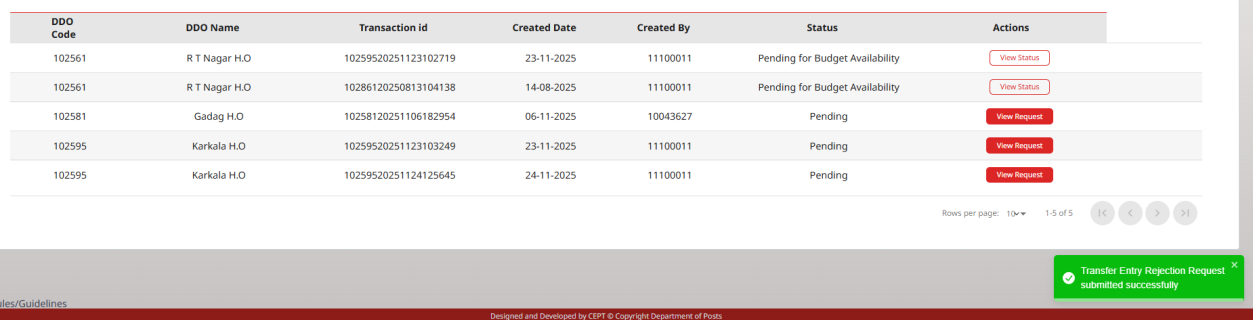
Two messages will be displayed -- one success message and another message as “Transfer Entries having Budget heads will be verified after checking the availability of funds. Please check this page again after sometime for verification status.” If a budget check is required, the status will be displayed as “Pending for Budget Availability.” By clicking on the “View Status” option in the Action column, the message (as shown above) can be viewed. Once the posting is successful, the TE will not be in pending status. INDIA POST – Advance Postal Technology Page 10 of 11 |


PAO SOP N0. 1 - Revert Cash Book from PFMS & Budget Check for TE Verification dated 17.04.2026 |
|---|
If the budget check is completed and the Transfer Entry (TE) posting fails due to insufficient budget, the status will be displayed as “The transfer entry operation could not be completed due to insufficient budget.” By clicking on the “View Status” option in the Action column, the message (as shown above) can be viewed. In such cases, the TE has to be rejected. Enter the Reason for rejection and click on the Reject button. A confirmation message will be displayed. Click on Yes to proceed further A Rejection message will be displayed to the user ***End of the Document*** INDIA POST – Advance Postal Technology Page 11 of 11 |

Discussion
0 notes
Ask a question or add a note…